Setting timed overrides
Objects that are represented by text boxes or toggle button elements can be overridden from a page. Operators that are in security groups with override permission can apply either of two types of overrides.
Immediate As soon as the Override dialog is closed, the override value becomes active.
Scheduled The override takes effect at a designated time.
An override can be applied only to a text box or a toggle button element. However, any indicator, dynamic text, or animation element bound to the same point as the text box or toggle button will display the override indicators.
Note: Operators must be in a security group that has been granted override permission by the system administrator. Override permission cannot be added in the Web Portal.
General rules for overrides
- A timed override can only be added to an element on an HTML5 page.
- Timed overrides can be set only for BACnet Value objects.
- A duration must be selected. Once the duration has expired, the override is removed and the point returns to normal operation.
- If Immediate is the chosen value for Override Start, the override starts as soon as OK is clicked.
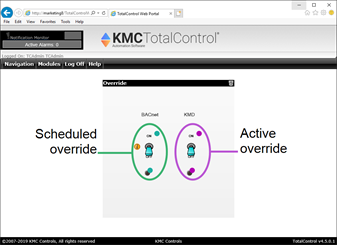
- Color-coded status icons next to the point indicate the status of the override.
| Purple |

|
The point is active and using the override value. |
| Green |

|
The point is operating normally, but an override value is scheduled. |
Toggle button elements with overrides
 To override a point, do the following
|
1
|
Log on to the TotalControl Web Portal. |
|
2
|
From Navigation, choose a page. |
|
3
|
On the page, locate the point to override. |
|
4
|
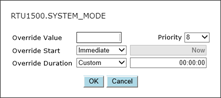
Right-click the point and choose Override from the shortcut menu. The Override dialog opens. |
|
5
|
Enter the following values: |
- In Override Value, enter or choose the value for the override.
- In Override Start, choose either a time to start the override or Immediate.
- In Override Duration, select or enter how long the override should last.
|
6
|
For BACnet controllers, choose a Priority value for the override. |
|
7
|
Click OK when finished. |
To delete an override, do the following:
|
1
|
Log on to the TotalControl Web Portal. |
|
2
|
From Navigation, choose a page. |
|
3
|
On the page, locate the point to restore. |
|
4
|
Right-click the point and choose Cancel Override. |